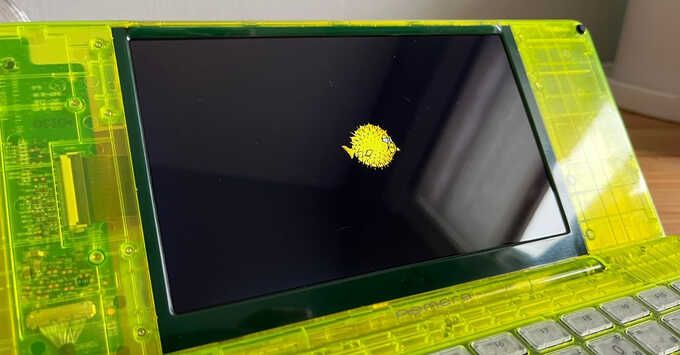
OpenBSD-current now runs on the Japanese Pomera DM250, DM250X, and DM250XY—compact ARM-based writing devices from King Jim. These machines pack a 5.7-inch touchscreen, full keyboard, and eMMC storage, originally shipping with a Linux distro for distraction-free note-taking. Enthusiasts can swap in OpenBSD using custom kernels and U-Boot images, but support remains experimental. Much of the work stays uncommitted upstream, so expect instability. Install at your own risk: a drained battery from bugs might brick the device, preventing recharge without hardware intervention.
These devices shine for portable, secure text entry. OpenBSD’s pledge, unveil, and strict memory protections make it ideal for paranoid users drafting sensitive docs offline. Yet the hack demands technical chops. Skip the US-model DM250US—its power chip and keyboard differ, breaking compatibility.
Risks and Prerequisites
Brick potential tops the list. A software glitch draining the battery leaves the DM250 unresponsive to USB-C charging. Recovery often requires cracking open the case for USB access. Factory Linux vanishes once you flash custom U-Boot; restoring needs EFI booting from an SD card.
Backup first. Use tools from EKESETE.net to image the full eMMC. This 8-16GB NAND holds the stock OS, recovery partitions, and user data. One overlooked step, and you’re stuck.
Power quirks abound. USB-C keeps the device alive even after halt -p, rebooting instantly. Custom U-Boot checks lid status: closed lid halts boot to avoid draining during desk charging. A charged battery remains essential—low juice starves boot even plugged in.
Hardware and Boot Mechanics
Pomera’s Rockchip RK3566 SoC (quad A55 cores at 2GHz, Mali-G52 GPU) pairs with 4GB RAM and 64GB eMMC. Factory U-Boot sniffs Right Shift + Left Alt at power-on: three-second hold triggers recovery Linux from dedicated partitions. This mounts SD cards and runs _sdboot.sh silently—no console output.
Hold too long? Graphical hardware diagnostics kick in. Post-flash, EFI-only booting rules; stock Linux dies. Custom U-Boot adds lid detection and power smarts, addressing factory oversights.
Installation Steps
Grab pre-built images: custom U-Boot and OpenBSD kernel. Format a microSD (16GB+ Class 10) with FAT32. dd the U-Boot image to raw device:
$ sudo dd if=u-boot-dm250.img of=/dev/sdX bs=512 seek=8 conv=notrunc status=progressCopy OpenBSD install media (minirootXX.img) to the SD root. Boot recovery: Right Shift + Left Alt + Power for 3s. The script flashes U-Boot to eMMC.
Reboot into U-Boot. Drop to EFI shell, boot installer. Partition eMMC: 1GB /, swap, rest /. Install proceeds standard OpenBSD—select ARM64, network optional (WiFi via athn0). Post-install, enable services in /etc/rc.conf.local.
Build custom ramdisk for headless installs: compile with cd src/distrib/arm64 && make obj && make ramdisk. Tweak for DM250 GPIO/power.
Recovery and Fixes
Bricked? Serial console via opened case (USB-to-TTL on test points). Or USB recovery mode if battery holds charge. Boot install SD, drop shell, dd stock U-Boot back:
fs0: > map
fs0: > chainload install media
# In shell: dd if=stock-u-boot.img of=/dev/rsd0c
Stock images live on EKESETE.net. Test battery pre-flash; cycle power fully unplugged.
This setup unlocks OpenBSD’s audit(4) logging and systrace on a pocket Unix. Developers inch toward upstream merge—watch openbsd/src CVS. For security pros, it means encrypted notes on hardware immune to supply-chain blobs. Casual users? Stick to factory Linux. Tinkerers gain a secure field terminal, but one dead battery erases the win. Total cost: $500 device + hours debugging. Worth it if you value code over convenience.