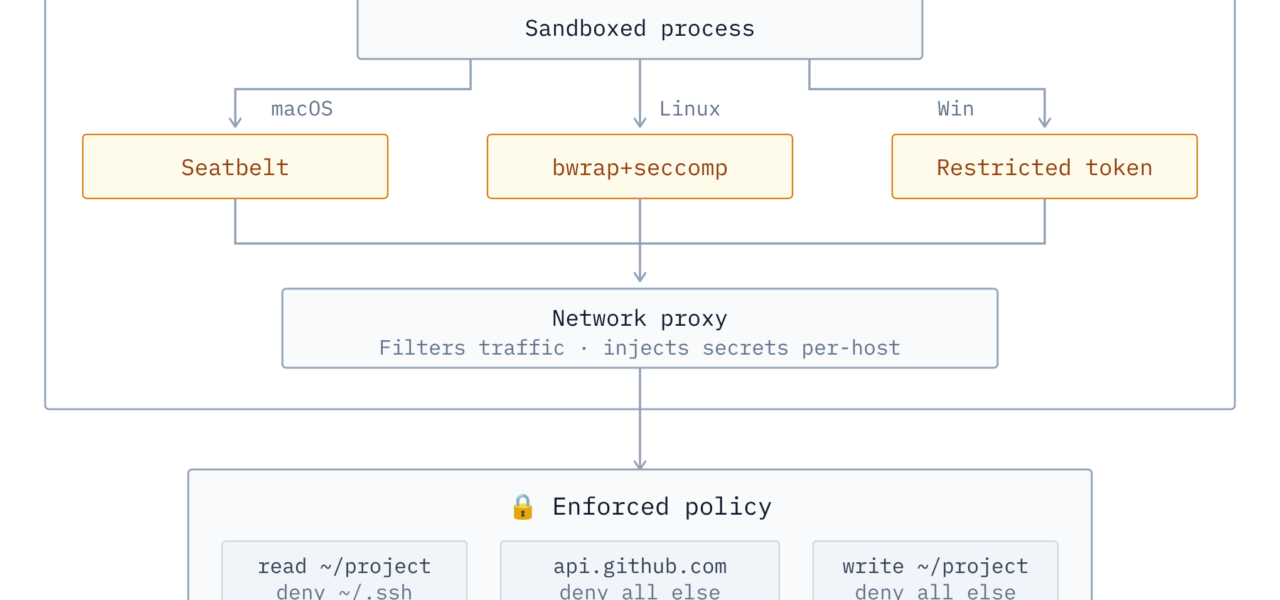
Zerobox sandboxes any command-line program across Linux, macOS, and Windows using a single Rust binary. It enforces a deny-by-default policy—commands can only read files by default, with all writes and network access blocked. Developers built it on sandboxing crates from OpenAI’s Codex repository, adding features like credential injection via an MITM proxy. This matters because running untrusted code, especially AI agents, risks data leaks, file tampering, or unauthorized network calls. Zerobox runs locally without VMs, Docker, or cloud services, keeping overhead low.
Start with a basic example. To prevent a command from reading sensitive directories:
zerobox --deny-read=/etc -- cat /etc/passwdThe cat command fails with “Operation not permitted.” Zerobox leverages native OS sandboxes: BubbleWrap on Linux, Apple’s Sandbox on macOS, and Windows’ Job Objects or similar for process isolation. No configuration files or complex setups—just flags on the CLI.
Network Control and Secret Injection
Zerobox’s MITM proxy handles network traffic. It blocks outbound connections unless explicitly allowed and injects secrets transparently. For instance, set an environment variable like OPENAI_API_KEY, then run:
zerobox --secret OPENAI_API_KEY=$OPENAI_API_KEY --secret-host OPENAI_API_KEY=api.openai.com -- bun agent.tsThe sandboxed Node.js script sees a placeholder. When it attempts a call to api.openai.com, Zerobox swaps in the real token at the network layer. The process never accesses the actual secret, reducing exposure risks. This beats passing keys via env vars, which tools like curl or scripts can log or dump.
Compare this to Deno’s runtime, which Zerobox emulates: Deno blocks filesystem writes and network by default, but requires its JS/TS engine. Zerobox wraps any binary—Python scripts, compiled apps, or AI tools—making it more flexible for mixed environments.
Why It Matters for AI Agents and Local Tools
Local AI execution is exploding. Tools like OpenClaw, Claude.dev, or custom LLM agents fetch models, query APIs, and process files. A single misconfigured agent can exfiltrate ~/.ssh/id_rsa or hit your corporate VPN. Zerobox profiles could preload policies for these: imagine zerobox claude denying writes outside /tmp, whitelisting OpenAI endpoints, and injecting keys.
Existing options fall short. Firejail (Linux-only) needs profiles per app. NsJail adds seccomp but lacks cross-platform support. gVisor or Kata containers demand kernel modules or VMs, spiking CPU by 10-50% for simple tasks. Zerobox claims near-native performance since it uses OS primitives. Benchmarks aren’t public yet, but Rust’s safety and single-binary design (under 10MB likely) make it deployable in air-gapped setups or CI pipelines.
Security researchers use similar wrappers for malware analysis. Zerobox extends this to everyday dev workflows: test a npm package without network? Block it. Run a sketchy CLI tool from GitHub? Sandbox first. In crypto/trading bots, where one leak costs thousands, secret injection prevents key exposure even if the binary is compromised.
Skepticism is warranted. MITM proxies cover TCP/UDP but might miss Unix sockets or D-Bus on Linux. Native sandboxes have escape histories—BubbleWrap patched CVEs in 2022. OpenAI’s crates originate from their infra, but Zerobox adds custom logic; audit the repo (assuming it’s open-source per HN norms). Cross-platform uniformity sounds ideal, but Windows sandboxing lags—verify Job Objects block registry reads effectively.
The developer plans agent wrappers, which could standardize secure local AI. Test it yourself: clone, build, run against real workloads. If it delivers, Zerobox fills a gap between naive ./script.sh and enterprise overhead. Watch the demo for visuals. For AI-heavy teams, this cuts breach vectors without slowing iteration.