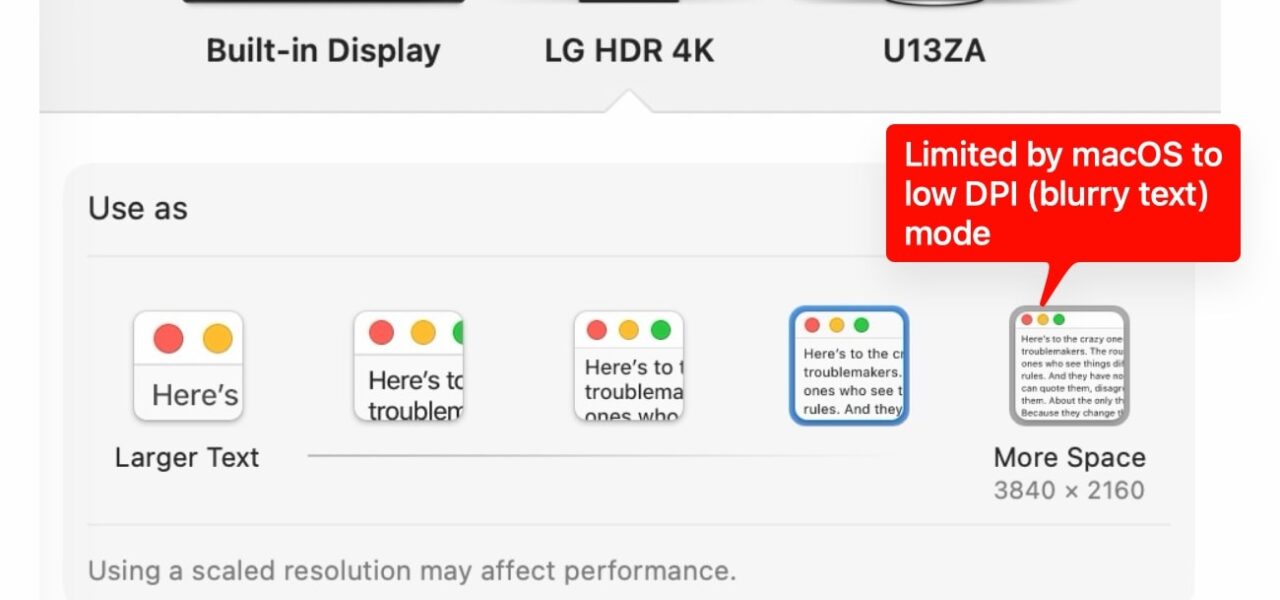
Apple’s M4 chips cripple HiDPI support on external 4K displays at 60Hz. Recent Hacker News threads reveal tests showing Mac minis and MacBook Pros with M4 processors force users to pick: sharp Retina text at 30Hz or blurry, scaled graphics at full 60Hz. This hits developers, designers, and analysts who tether high-res external monitors for workspace expansion.
The problem stems from macOS’s HiDPI mode, where the system renders interfaces at double resolution for crispness—logical 1920×1080 pixels map perfectly to a 3840×2160 physical panel. On external displays, Apple negotiates custom timings via EDID extensions to enable this at higher refresh rates. M4 hardware balks here. Bandwidth isn’t the culprit: uncompressed 4K60 RGB 8-bit demands 14.93 Gbps, well under HDMI 2.1’s 48 Gbps ceiling or Thunderbolt 4’s 40 Gbps. Instead, the M4 display engine rejects HiDPI pixel clocks or timings above 30Hz for external outputs, likely a cost-saving cut in the SoC’s display pipeline to shrink die size or boost efficiency.
Historical Context and M4 Specifics
M1 through M3 chips handled this better. Users routinely ran 4K60 HiDPI via DisplayPort adapters on monitors like Dell U2720Q or LG 27UK850, hitting pixel-perfect scaling without hitching. SwitchResX or custom EDID hacks extended options. M4 changes the game: Mac mini M4’s HDMI 2.1 port tops out at native 3840×2160@60Hz “scaled” mode—logical resolutions like 2560×1440 render blurry because the OS upscales rather than renders natively at 2x. Reports confirm even USB-C to DP cables fail HiDPI at 60Hz on M4 Pro/Max configs.
M5 rumors amplify concerns. Leaks suggest Apple trims display taps further for thinner devices, capping external HiDPI bandwidth at levels unfit for 4K60. Apple’s spec sheets boast “up to 8K60 or 4K240 with DSC,” but DSC stays off for HiDPI external—macOS reserves it for raw video or high-refresh gaming, not UI scaling. Tests on Sequoia 15.1 beta show no toggle; it’s baked into the firmware.
Implications for Users and Workarounds
This matters because 4K@60Hz rules external monitors—27-inch panels cost $300-500, fitting dual setups on desks. Blurry text murders productivity: code diffs blur, charts smudge, crypto tickers lose edge. Finance pros charting BTC/ETH on TradingView suffer; security analysts miss pixel-level details in packet captures. Apple’s fix? Buy a $1,599 Studio Display or $3,499 Pro Display XDR for guaranteed 5K/6K HiDPI at 60Hz. Convenient for margins, lousy for choice.
Workarounds exist, but falter on M4. Force timings with SwitchResX ($20 lifetime)—injects CVT-RB timings for 3840×2160@60Hz HiDPI—but M4 firmware blocks them, risking black screens. Better displays help: LG 27UP850 or Samsung ViewFinity S9 negotiate HiDPI natively via DP 1.4. Drop to 30Hz: tolerable for static work, stuttery for scrolling. Dual-monitor setups? M4 base supports one external; Pro/Max hit two 6K60, but 4K still gimped. Long-term, watch macOS 15.2—software might patch if not hardwired. Skeptical take: Apple’s internal Retina obsession prioritizes laptop screens; externals remain afterthought, herding users into ecosystem lock-in.
Bottom line: If chaining a 4K external to M4, test before buying. Bandwidth headroom exists; Apple’s choices don’t. This exposes Silicon growing pains—powerful GPUs, finicky pipes. For Njalla users eyeing Mac upgrades, stick to M3 for display flexibility or budget for Apple’s overpriced screens.